← All projects / 02
Technical case study · 02
BMS Pricing & Quoting
An internal Access/VBA application that turned fragmented spreadsheets and manual estimates into a guided quotation workflow.
From requirements to implementation
I designed the application around work details, material and labour estimation, pricing review and quotation/BOQ output. During design, I questioned whether one overall margin could meet the needs of projects with different cost structures. After manager discussion, the more detailed version supported both project-wide and five category-specific gross margins.
The screen below illustrates the expanded Pricing Review configuration; the simpler application walkthrough on Notion does not show every advanced feature.
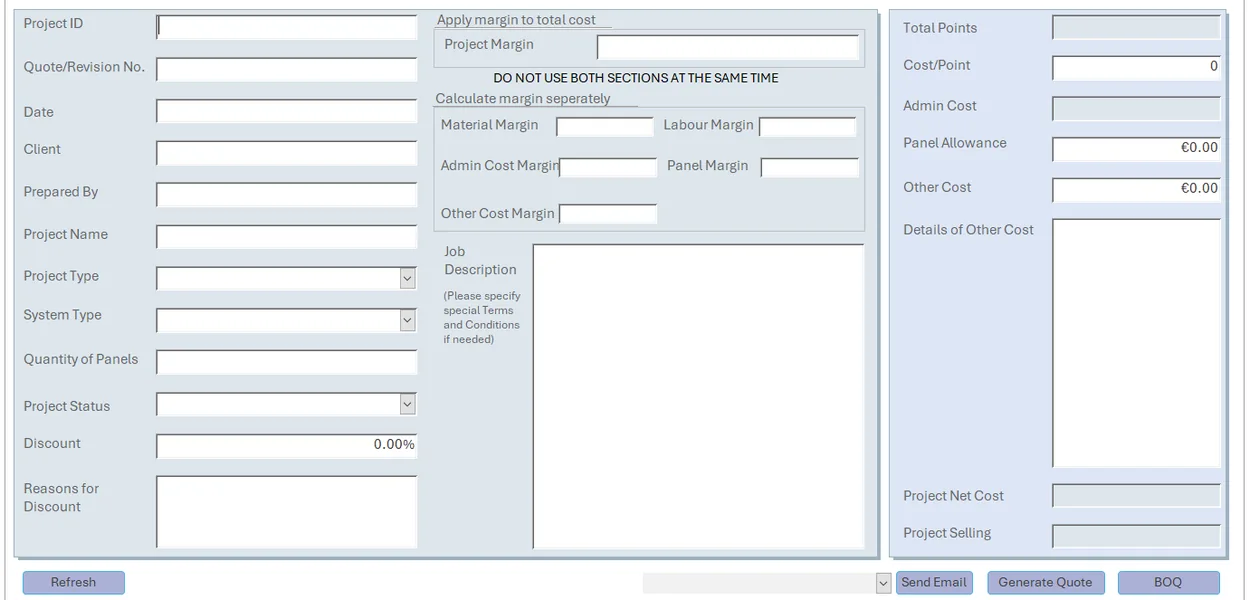
Anonymised view · extended Pricing Review form
Pricing logic and calculation precedence
The observed design used calculated form controls and VBA to write updated cost totals and select a selling amount. Five cost components—Material, Labour, Administration, Other Costs and Panel—could receive separate margins. When the category calculation returned a value, it took priority; otherwise the process fell back to the single project-wide margin.
| Pricing rule | Calculation |
|---|---|
| Project-wide gross margin | S = C / (1 − m) × (1 − d) |
| Category-specific | S = (1 − d) × Σ(Cᵢ / (1 − mᵢ)) |
| Fallback | Category result when available; otherwise project-wide result |
Discount is applied after gross-margin pricing; this can lower the achieved margin. Category calculations require all five margin fields and explicit zero entries for absent Other / Panel costs.
Curated excerpt from the independent VBA demo
If categoryReady Then
    ' Calculate five category selling amounts, then discount.
    For i = 0 To CATEGORY_COUNT - 1
        rate = ParseMargin(categoryMargins(LBound(categoryMargins) + i))
        categorySelling = categorySelling + numericCosts(i) / (1# - rate)
    Next i
    CalculateSellingPrice = RoundHalfUpCents(categorySelling * (1# - discountRate))
    Exit Function
End If

' Fallback to project-wide margin if category calculation is unavailable.
If Not IsBlankInput(projectMargin) Then
    rate = ParseMargin(projectMargin)
    CalculateSellingPrice = RoundHalfUpCents(totalCost / (1# - rate) * (1# - discountRate))
Else
    CalculateSellingPrice = Null
End If
This code is from my reconstructed, stateless demonstration—not the employer’s form event handler.
Validation and engineering trade-offs
I compiled and ran the synthetic VBA implementation in Microsoft Access. The standalone test harness passed 14 of 14 scenarios across five consecutive runs, covering standard calculations, missing inputs, fallback logic, discounts and invalid values.
Other lessons include the risks of shared Access files and the case for controlled supplier catalogue imports. These are documented as engineering trade-offs, not claims of production fixes.