Procurement & Fleet Analytics | Power BI, DAX & Power Query
Technical portfolio case study · Procurement reporting, data standardisation, management KPIs and fleet cost analysis
Project scope: I independently developed the workplace report. This portfolio uses anonymised visuals, reconstructed M examples and portfolio-refined DAX. See provenance for source boundaries.
Project at a glance
The original reporting process brought together recurring procurement data from CSV/Excel and SharePoint, followed by manual spreadsheet and presentation work. I designed a Power BI reporting solution with repeatable data preparation and interactive analysis for procurement leadership.
- Reporting outcome: month-end preparation decreased from approximately 2–3 working days to under 2 hours (project-reported operational improvement, not a controlled time study).
- Analytical design: latest-month KPIs and prior-month comparisons; reporting-year summaries; supplier and contract rankings; open-order visibility; separate fleet analysis.
- My contribution: independently designed the report, performed data cleaning, created DAX measures and introduced an Open Orders perspective to identify purchasing records requiring follow-up.
- Source landscape: recurring CSV and Excel extracts plus SharePoint information; the fleet section incorporates separate fleet reference and service-cost data.
Dashboard preview
| Latest-month summary | Contract / Top 10 analysis |
|---|---|
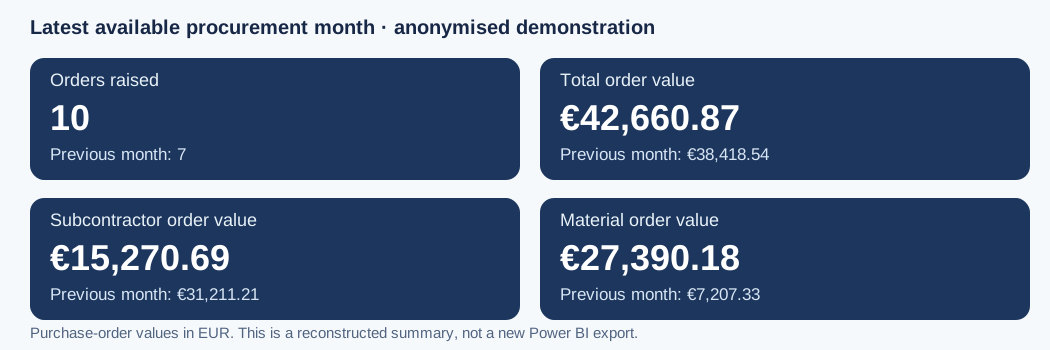 |
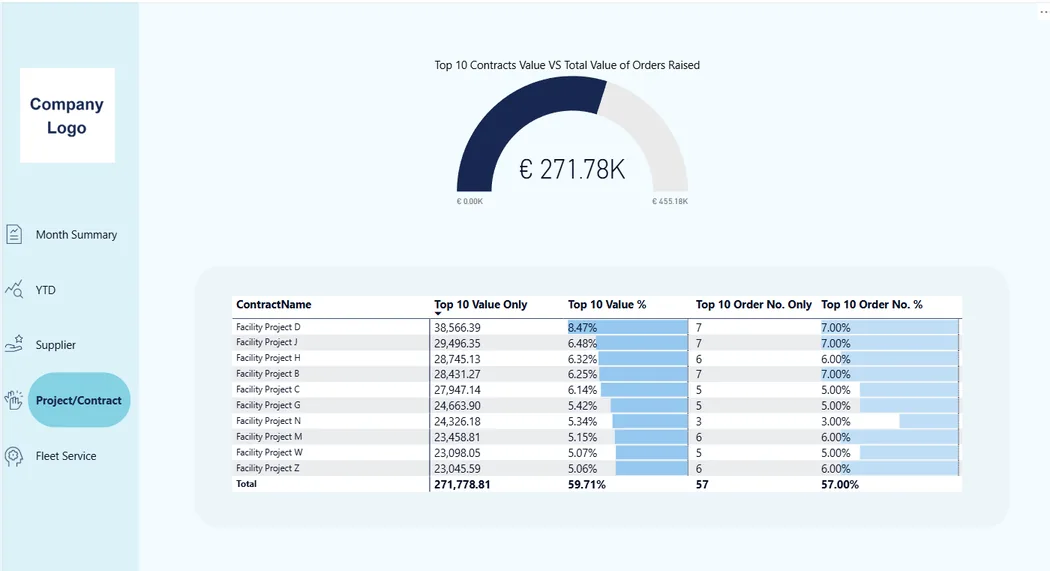 |
The latest-month graphic is reconstructed from anonymised KPI results with clarified order-value labels. The contract image is an anonymised Power BI screenshot; neither is a live corporate report.
Technical highlights
| Case | Problem addressed | Approach / evidence |
|---|---|---|
| Monthly KPI logic | Stable current/prior-month comparisons as data refreshes | Latest-order-date anchor, calendar date windows, CALCULATE / DATESBETWEEN |
| Top 10 contracts | Measure purchase-order value concentration and count of orders in top-value contracts | RANKX, TOPN, KEEPFILTERS, filter context |
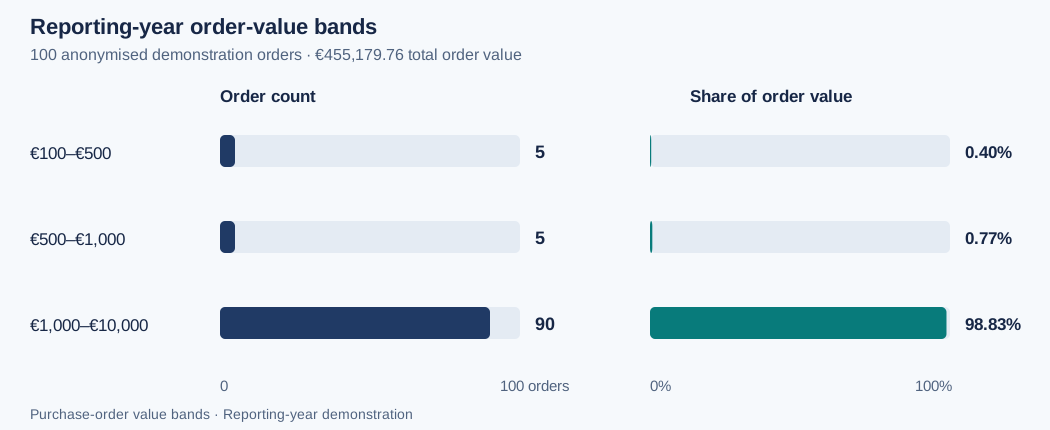
| Value tiers | Segment procurement by order value | Disconnected tier table, SELECTEDVALUE, FILTER, reconciliation with SUMX |
| Supplier standardisation | Resolve spelling/case variants without dropping unmatched orders | Curated alias map, normalised keys, left join, quality flags |
| Currency normalisation | Parse amounts containing £ and standardise reporting to EUR |
Trim, detect currency, Number.FromText, illustrative FX parameter, error flags |
| Fleet cost consolidation | Reconcile heterogeneous Fuel / Toll / Parking / EV records | Source-specific normalisation, date parsing, append, quality checks |
Data model and report scopes
The demonstrated procurement model centres on ProcRep and a related Power Query RollingCalendar date table (1:* relationship shown in Model View). Value Tiers is a disconnected amount-band table used through DAX. FleetSheet and FleetService are analysed separately rather than artificially joined to procurement.
- Month Summary: latest month in procurement data (current vs prior month).
- YTD / Supplier / Project–Contract: reporting-year analysis in the supplied demonstration (scope comes from page/report data and filters; this repo does not assume every visual is latest-month).
- Fleet Service: separate provider / fuel distribution and service-cost analysis.
See Architecture and DAX design notes.
Reproduce the Power Query examples
The three ETL examples include synthetic in-memory inputs and require no corporate connections. The separate RollingCalendar_Fixture.pq query requires the ProcRep fixture described in reproduction instructions.
- Open Power BI Desktop → Transform data.
- Create Blank Query → Advanced Editor.
- Paste the contents of one file from
powerquery/. - Select Done, then compare its preview with
docs/validation.md. - Repeat for the other ETL examples. Create the calendar only after loading the separate DAX fixture.
The DAX examples are not a turnkey PBIX; they require equivalent ProcRep, RollingCalendar and Value Tiers tables and the appropriate calendar relationship. A proprietary PBIX is intentionally not distributed.
Validation snapshot
| Check | Result or expectation | Evidence scope |
|---|---|---|
| Core procurement counts / value | 100 orders / €455,179.76 | Demonstration data reconciliation |
| Top 10 contracts | €271,778.81 / 57 orders | Matches contract report in supplied model |
| Value-tier allocation | 100 allocated, 0 unassigned | Current 100-row demonstration dataset |
| Fleet M sample | Expected: 9 rows; 5 OK / 4 ERROR; €123.54 in OK rows | Independent expected result; see verification notes |
| Supplier M sample | 9 rows, 7 mapped, 1 review, 1 missing | Power Query normal-path test |
| Currency M sample | 8 rows; 5 numerical outcomes; €2,705.85 | Includes flagged assumptions / errors |
A separate 12-order synthetic DAX fixture supplies minimal model inputs; it does not recreate the 100-order screenshot.
See Validation and limitations for the exact meaning of each check.
Documentation
- Model and data flow
- DAX implementation and design decisions
- Power Query ETL decisions
- Verification log and known edge cases
- Provenance, security and publication boundaries
Tools: Power BI Desktop, DAX, Power Query M, Excel/CSV, SharePoint Online (historical source platform).
Architecture and reporting design
Scope
This diagram summarises the project design. It is not an extracted PBIX model specification.
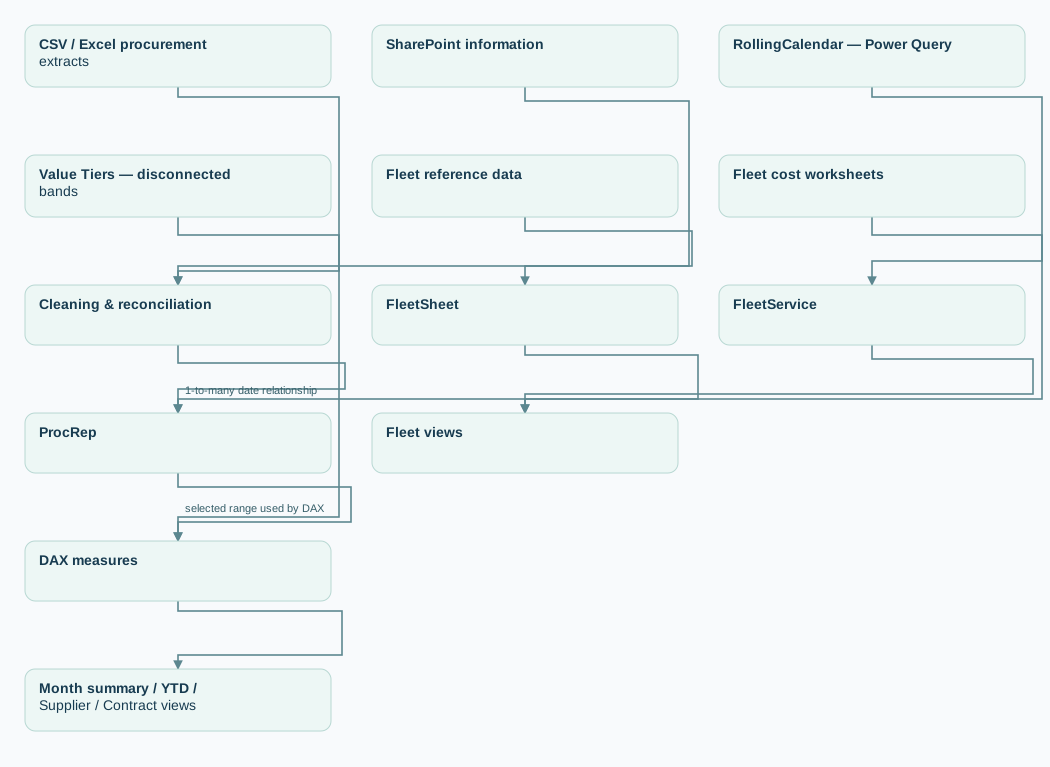
View diagram source
flowchart LR
    A[CSV / Excel procurement extracts] --> B[Cleaning & reconciliation]
    C[SharePoint information] --> B
    B --> P[ProcRep]
    D[RollingCalendar — Power Query] -->|1-to-many date relationship| P
    P --> M[DAX measures]
    T[Value Tiers — disconnected bands] -->|selected range used by DAX| M
    M --> E[Month summary / YTD / Supplier / Contract views]
    F[Fleet reference data] --> G[FleetSheet]
    H[Fleet cost worksheets] --> I[FleetService]
    G --> J[Fleet views]
    I --> J
Confirmed logical tables
| Table | Role | Evidence / limits |
|---|---|---|
ProcRep |
Procurement records; Ord uniquely identifies an order in the supplied dataset |
Fields include Ord, Exvat, Orderdate, ContractName, SupplierName, StatusCategory, OrdType |
RollingCalendar |
Date attributes and time-window filtering | Power Query table; relationship shown in Model View |
Value Tiers |
Range definitions: RangeName, Min, Max, SortOrder |
Manually entered; used by DAX without a physical relationship |
FleetSheet |
Fleet by provider / fuel source | Separate visual module |
FleetService |
Fleet service spend by cost category and month | Original workbook was irregular; displayed model is wide by month |
Source and transformation distinctions
The historical project involved monthly CSV/Excel extracts and SharePoint information. The original production M applied-step history is not included in this public package. This repository therefore does not attribute its reconstructed M source code to the original PBIX. See etl_design.md.
Reporting scopes
- Month Summary: based on the latest date in the full procurement dataset, then compares current and previous calendar months.
- YTD and ranking pages: the supplied example contains a single reporting-year dataset; the supplier and contract totals match the YTD total. No automatic multi-year filter logic is claimed here.
- Fleet: reporting from independent tables without unsupported cross-model relationships.
Design trade-offs
- Disconnected value tiers: concise and controllable business bands, but requires DAX calculation and explicit total handling.
- Wide fleet service data: sufficient for the shown matrix; an unpivoted
Date/Category/Coststructure would simplify ongoing multi-year analysis. - Calendar anchored on latest data: ensures a consistent reporting month; requires tests when source dates extend beyond intended reporting periods or when business wants a manually selected cutoff.
DAX design notes
1. Dynamic month anchor
Source: dax/01_monthly_kpis.dax
The KPI month is derived from the maximum ProcRep[Orderdate], rather than the system clock. Removing filters from procurement and calendar tables keeps the anchor stable across the demonstrated report.
Report Month Start = DATE(YEAR(MaxDate), MONTH(MaxDate), 1) and Report Month End = EOMONTH(MaxDate,0) establish a calendar-month range. Current and previous month measures then use DATESBETWEEN on the related calendar table. The previous month is selected with EDATE and the day preceding the current month start.
Important: these are latest-available-data metrics, not necessarily current wall-clock month metrics. For data freshness, compare the data date with the expected refresh cutoff.
2. Top-value contracts
Source: dax/02_top10_contracts.dax
RANKX ranks contracts by their order value. TOPN selects that value-based cohort, and KEEPFILTERS retains the intersection with current selection where applicable. The number of orders then describes orders belonging to those top-value contracts; it is not an independent ranking by order count.
- In the demonstrated reporting-year data, top contracts total €271,778.81 and 57 orders.
TOPNmay return more than ten entries when the last position is tied.- A rank evaluated in a grand total context may not have meaningful business interpretation. It can be hidden for row-only display using
ISINSCOPEin an optional, separately tested enhancement. - A prospective design change from
ALLtoALLSELECTEDwould alter whether user-selected contract restrictions participate in the ranking; do not make that change without a business requirement.
3. Value tiers
Source: dax/03_value_tiers.dax
The tier table is disconnected. Each band selects Min/Max, and DAX filters order value with the rule Min < OrderValue <= Max. SUMX(VALUES(...)) can sum the results over the bands when a grand total has no single selected tier. The reconciliation measure subtracts assigned orders from total orders.
In the demonstrated 100-order dataset, all 100 are allocated and none remains unassigned. This does not establish coverage for future zero/negative/blank orders or values above the highest configured maximum.
4. Scope and assumptions
ProcRep[Ord] was confirmed unique for the current demonstration, so COUNTA(Ord) can serve as the displayed order count. If another source introduces order-line granularity, replace the counting approach only after rechecking the data grain.
The provided DAX examples assume an active RollingCalendar[Date] date relationship. The month measures explicitly remove date-table filters to implement the latest available month specification; unrelated page filters may still affect the measure being summed.
Power Query ETL design
Supplier name normalisation
Confirmed historical practice: supplier names were extracted from CSV, cleaned in Excel (including TRIM / manual review), and grouped using a manually curated mapping table.
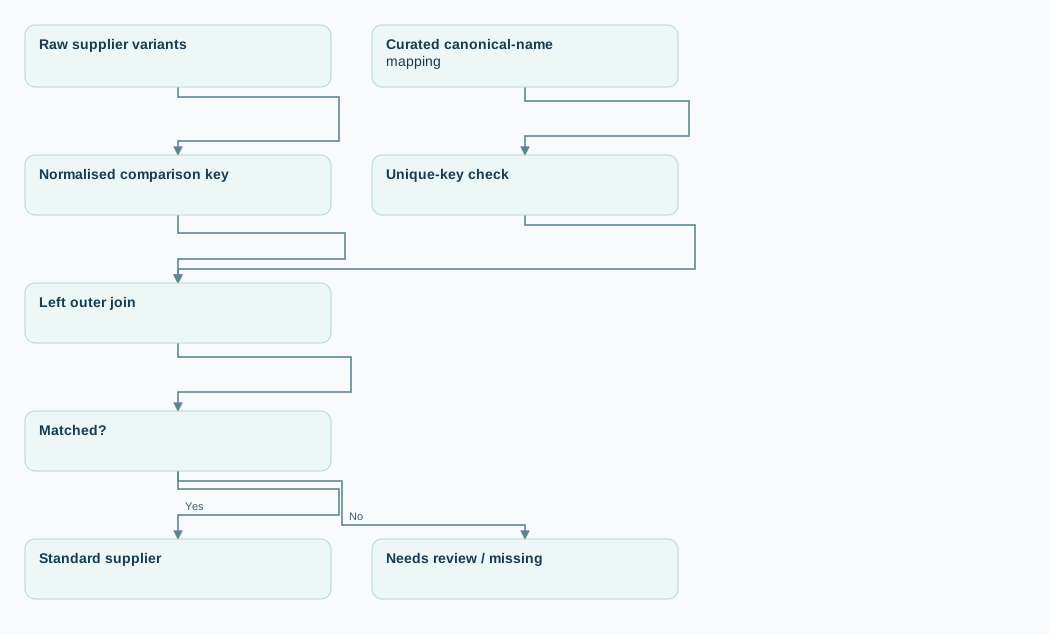
View diagram source
flowchart LR
 A[Raw supplier variants] --> B[Normalised comparison key]
 C[Curated canonical-name mapping] --> D[Unique-key check]
 B --> E[Left outer join]
 D --> E
 E --> F{Matched?}
 F -->|Yes| G[Standard supplier]
 F -->|No| H[Needs review / missing]
Reconstructed additions, not asserted historical features: status flags for unmatched/missing names; unique mapping key guard; retention of unmatched orders and raw names. Automated fuzzy merges are intentionally avoided to reduce false positives.
Procurement GBP/EUR normalisation
Confirmed historical practice: GBP-to-EUR conversion used Power Query M. Some CSV monetary amounts contained £ and a number in the same cell, and whitespace cleanup was part of preparation. The public query is an independent reconstruction; exact historical rates and applied steps are not included.
Reconstructed pipeline: trim/clean text → detect £/€ → parse en-GB numeric text → apply FX rate → flag blanks, invalid amounts and unsupported symbols.
Safety: 1 GBP = 1.20 EUR is an illustrative test parameter, not a production exchange rate. A symbol-free cell is provisionally interpreted as EUR and flagged for review, not silently treated as verified EUR. No exchange-rate-date policy is invented.
Fleet service cost consolidation
Historical basis: the source workbook had separate Fuel / Toll / EV / Parking worksheets with inconsistent field naming, date-time fields and currencies. A historical process note described renaming, date conversion and append-based consolidation.
Example normalises different date and amount column names to a common schema, then uses Table.Combine to append rows. It retains original currency, raw numeric amount, illustrative conversion rate and quality flag and reason for auditability. The revised query catches scalar date, amount, currency and FX errors; non-OK rows have no reporting EUR value. The resulting example is a long-table cost input, whereas the displayed FleetService report table was month-oriented and wide; they should not be presented as the same final source-query output.
Production-minded improvements (not historical claims)
- Use maintained period-based conversion rates and confirm financial policy.
- Reconcile row counts and monetary totals before and after merges/append operations.
- Avoid deleting orders with unmapped supplier names; produce exception queues.
- Validate the one-row-per-key condition in lookup tables before merging.
- Validate parsing under the relevant date and numeric locale.
- Store external paths / tenant information in controlled configuration rather than source code.
Numeric convention
The M examples round converted amounts to two decimal places using an explicit RoundingMode.ToEven rule. The 1.20 GBP-to-EUR parameter is illustrative.
Validation log and remaining tests
I recorded the historical reporting and query results below in Power BI Desktop using anonymised or synthetic data. Execution scope: the current nine-row Fleet fixture and separate 12-order DAX fixture have arithmetic expectations but have not been run in Power Query / Power BI. Tables distinguish observed records from expected outputs.
DAX / reporting demonstration
| Area | Test and observed result | Status |
|---|---|---|
| Latest-month time windows | QA max date, month boundaries and current / prior values aligned with month summary | Passed for current demonstration |
| Latest-month values | Current €42,660.87, prior €38,418.54; orders 10 vs 7 | Matched current demonstration |
| Base value and order count | 100 orders and €455,179.76 | Matched demonstration YTD |
| Value-based top contracts | Top 10 €271,778.81, 57 orders; row sums match total | Matched contract report |
| Value tier allocation | 100 allocated; 0 unassigned | Passed in current dataset |
| Value tier value reconciliation | €1,820.28 + €3,514.83 + €449,844.65 = €455,179.76 | Passed |
Power Query demonstration tests
| Query | Synthetic test expectations and observed outcome | Status |
|---|---|---|
| Fleet cost | Expected: 9 rows; 5 OK / 4 ERROR; valid GBP £25.50 → €30.60; OK-row total €123.54 | Independent expected result |
| Supplier mapping | 9 input → 9 output rows; 7 mapped, 1 needs review, 1 missing; €2,115 retained | Passed — normal path / flagged cases |
| Procurement currency | 8 input rows; 5 with numeric EUR values (€2,705.85 total); 4 OK, 1 Currency assumed: EUR, 3 with invalid/missing/unsupported amount |
Passed — demonstrated cases |

Preview of the self-contained reconstructed currency query in Power Query Desktop.
Revised Fleet fixture: expected exceptions
The five original normal-path records have been retained. Four additional EV records test unsupported currency, currency-symbol conflict, invalid amount text and invalid date text. Every non-OK record retains its raw amount and a reason; its reporting TotalCostEUR is blank so it cannot silently enter a valid reporting total.
| Added input | Expected QualityFlag | Expected reason |
|---|---|---|
30.19, explicit USD |
ERROR | Unsupported currency |
£10.00, explicit EUR |
ERROR | Currency conflict |
bad, explicit EUR |
ERROR | Invalid amount |
not-a-date, amount 12.00, EUR |
ERROR | Invalid date |
Each invalid Fleet row retains its reason and has no reporting EUR value. The execution scope above applies to these expected results.
Known untested or limited cases
- Monthly DAX: leap years, empty latest months, future-dated source orders, unusual date relationships and multi-year filter behaviour are not comprehensively tested.
- Top 10: tied tenth position, ranking under interacting slicers and grand-total rank presentation need additional tests if deployed beyond this demonstration.
- Value tiers: zero/negative/blank amounts and values exceeding the highest maximum; a total for the original
SELECTEDVALUEmeasure will be blank without an explicitSUMXreconciliation. - Power Query M: performance and security on large or adversarial real files, non-UK locales, duplicates in source records, FX rate effective dates and missing columns not fully tested.
- Fleet: the reconstructed long-table demo should not be mistaken for an exact final query or proof of the historical service-cost workbook's transformations.
Reproduce the DAX patterns with a separate synthetic fixture
This 12-order fixture is new and entirely synthetic. It does not recreate the 100-order screenshot or the original workplace dataset. The table below gives independent arithmetic expectations; see verification scope for execution evidence.
- Import
data_fixture/ProcRep_fixture.csv; name the table ProcRep. SetOrderdateto Date andExvatto a numeric/decimal type. Keep one row perOrd. - Create a blank query from
powerquery/RollingCalendar_Fixture.pq; name it RollingCalendar. - Import
data_fixture/Value_Tiers_fixture.csv; name it Value Tiers. Set Min/Max to numeric and SortOrder to integer. Sort RangeName by SortOrder. - Create an active, single-direction 1:* relationship from
RollingCalendar[Date]toProcRep[Orderdate]. Mark RollingCalendar as the date table. Leave Value Tiers disconnected. - Add the measures from
dax/01_monthly_kpis.dax,02_top10_contracts.dax, and03_value_tiers.daxindividually. These text files contain several measure definitions, not one importable DAX query.
| Check | Independent expected result |
|---|---|
| Full fixture | 12 orders / €15,000 |
| Latest order date | 2024-03-08 |
| Latest report month | March 2024 |
| Current-month value and count | €6,000 / 4 |
| Previous-month value and count | €5,000 / 4 |
| Tier order counts | 4 / 3 / 5 |
| Tier values | €1,000 / €2,400 / €11,600 |
| Tier allocation | 12 allocated / 0 unassigned |
With only four contracts, this fixture reproduces the ranking calculation but does not exercise a tied tenth position. The original 100-order snapshot's Top 10 totals are a separate historical demonstration result.
Fixture downloads
Provenance, IP boundaries and publication review
Read the detailed notes
What was done in the original project
I designed and delivered an internal Procurement & Fleet Power BI reporting solution, standardised recurring procurement data, supported management reporting and added Open Orders visibility. The estimate of month-end preparation effort fell from 2–3 working days to under two hours.
What this repository contains
- DAX: reviewed/refined implementations of the demonstrated analytical requirements, tested on a portfolio dataset; they are not certified exact copies of historical production source code.
- Power Query M: newly written independent reconstructions using synthetic records and explicit demonstration assumptions.
- Screenshots: anonymised replacement-data demonstration visuals shown in project review; not evidence of a live reporting environment.
- Business outcomes: retrospective project account; not independently audited and not measured by this code package.
What is not here
- Employer data, original supplier price lists, raw CSV/Excel extracts, SharePoint sites, credentials, company-specific identifiers or source URLs.
- Original production PBIX / Power Query applied-step history.
- Any claim that synthetic validation exercises were conducted during the original company project.