BMS Pricing & Quoting Application — Technical Case Study
Microsoft Access · VBA · Business rules · Workflow automation
Real project in context
I independently designed and developed an Access application that combined four supplier catalogues, material and labour estimates, pricing review and quotation/BOQ output. A manager supplied the initial workflow framework and requirements. Typical quotation preparation fell from approximately 2–7 days to half a day, depending on complexity; this is a retrospective estimate.
Version scope: the Notion walkthrough primarily shows the simplified maintenance-pricing application. The pricing rules and interface below concern the expanded project-pricing version. Published code is independently reconstructed with synthetic inputs; the employer database and source are excluded.
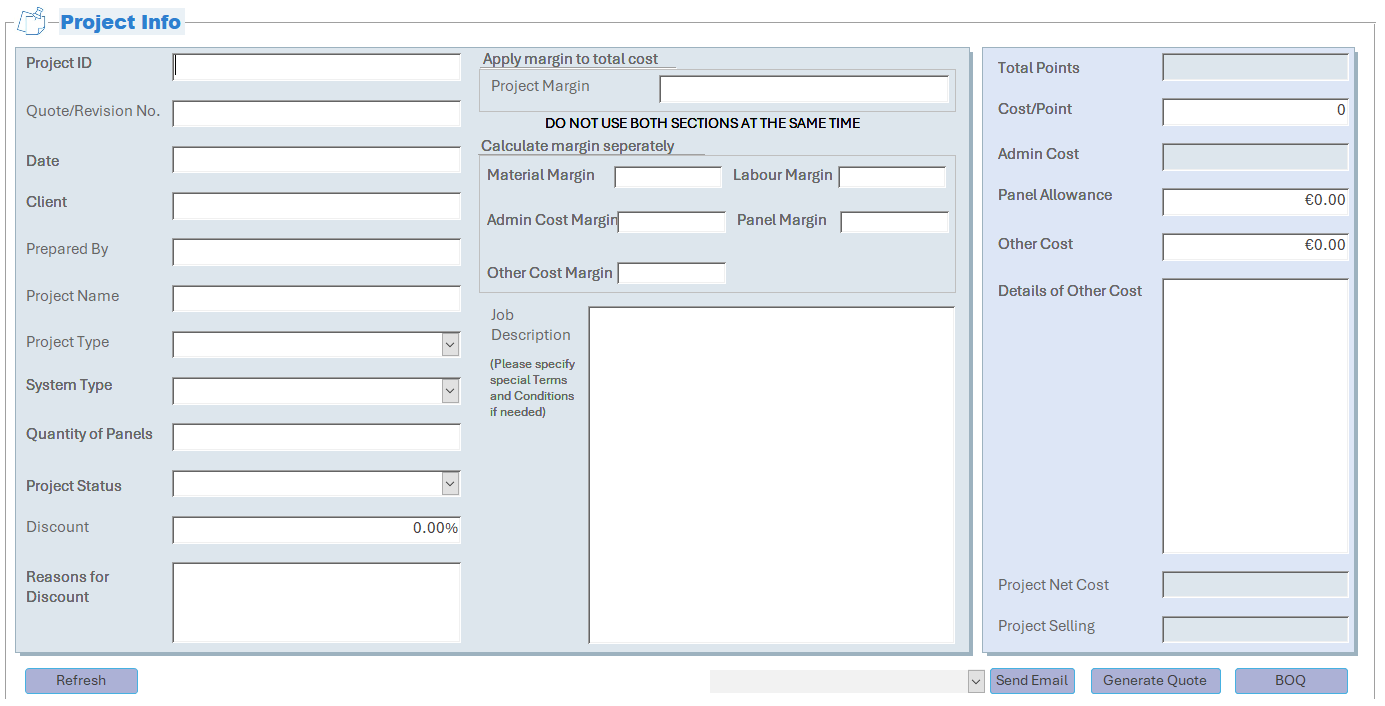
The screenshot documents the interface, not a calculated quotation. A worked example appears in pricing requirements.
Technical evidence
| Area | Evidence |
|---|---|
| Architecture | Data flow and illustrative model |
| Requirements | Pricing rules, precedence and acceptance scenarios |
| Implementation | Calculation design and input contract |
| Source | Pricing function and test harness |
| Verification | Expected scenarios and execution record |
| Form dependencies | Subform aggregation |
| Known defect | Refresh investigation |
What the expanded project-pricing workflow did
I proposed support for both an overall gross margin and category-specific margins. The interface instructed users to choose one method. The inspected implementation used the category result when available and otherwise the overall result. Discount followed margin pricing. See the requirements for exact inputs and fallback behaviour.
Material codes copied from a supplier library populated description and unit price. For applicable libraries, users manually confirmed the exchange rate through an Access form when opening the material library; displayed costs were in EUR.
Run the independent VBA example
- Open Microsoft Access or Excel on Windows and press Alt+F11.
- Import PricingDemo.bas and TestPricingDemo.bas through File → Import File. When pasting, omit the
Attribute VB_Namelines. - Compile if available, then run
RunPricingDemoTestsand inspect the Immediate window (Ctrl+G).
The function accepts five synthetic costs, gross-margin rates and a discount. It does not implement forms, catalogue lookup, PDF output or email drafting. Test expectations and the recorded execution scope are in test scenarios.
Architecture & Data Flow — Conceptual Reconstruction
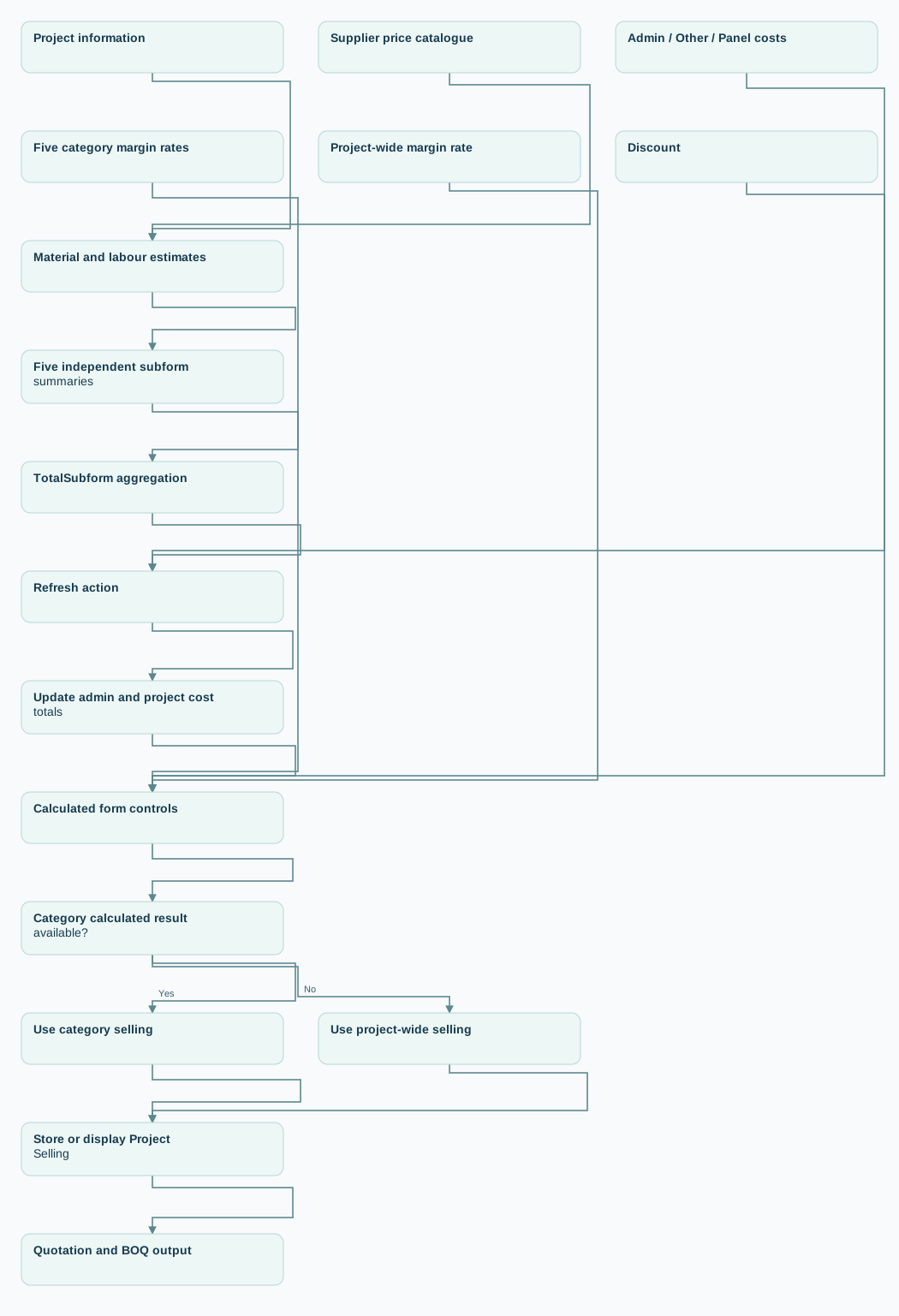
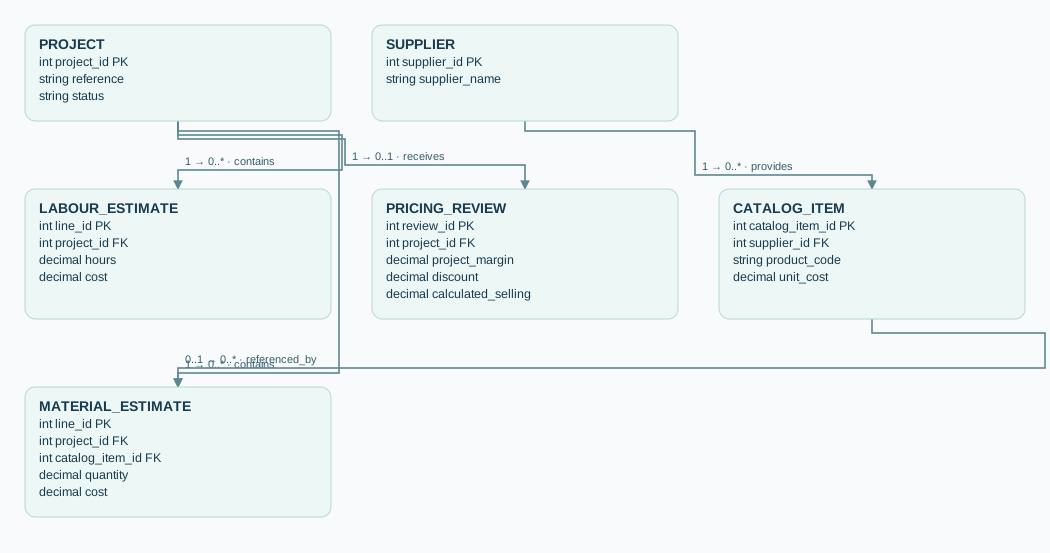
This diagram and entity model are independent abstractions, not an export of the original Access database. The exact original table schema, keys and cardinalities are not publicly supplied.
Functional flow
View diagram source
flowchart TD
    A[Project information] --> B[Material and labour estimates]
    C[Supplier price catalogue] --> B
    B --> D[Five independent subform summaries]
    D --> D1[TotalSubform aggregation]
    D1 --> E[Refresh action]
    P[Admin / Other / Panel costs] --> E
    E --> F[Update admin and project cost totals]
    F --> G[Calculated form controls]
    H[Five category margin rates] --> G
    I[Project-wide margin rate] --> G
    J[Discount] --> G
    G --> K{Category calculated result available?}
    K -->|Yes| L[Use category selling]
    K -->|No| M[Use project-wide selling]
    L --> N[Store or display Project Selling]
    M --> N
    N --> O[Quotation and BOQ output]
The original TotalSubform expression explicitly added five subform summary controls, each wrapped in Nz(). The original Refresh event assigned point totals, administration cost and ProjectCost before selecting between the two calculated selling controls. It used Me.Refresh at the end. The diagram does not represent Access's internal recalculation schedule or prove the update order is free of stale-value risks.
For the confirmed cost-dependency chain, see subform_aggregation.md. No row-by-row mapping from those five control values to the entities in the illustrative data model is asserted.
Illustrative relational model
View diagram source
erDiagram
    PROJECT ||--o{ MATERIAL_ESTIMATE : contains
    PROJECT ||--o{ LABOUR_ESTIMATE : contains
    PROJECT ||--o| PRICING_REVIEW : receives
    SUPPLIER ||--o{ CATALOG_ITEM : provides
    CATALOG_ITEM o|--o{ MATERIAL_ESTIMATE : referenced_by

    PROJECT {
      int project_id PK
      string reference
      string status
    }
    MATERIAL_ESTIMATE {
      int line_id PK
      int project_id FK
      int catalog_item_id FK
      decimal quantity
      decimal cost
    }
    LABOUR_ESTIMATE {
      int line_id PK
      int project_id FK
      decimal hours
      decimal cost
    }
    SUPPLIER {
      int supplier_id PK
      string supplier_name
    }
    CATALOG_ITEM {
      int catalog_item_id PK
      int supplier_id FK
      string product_code
      decimal unit_cost
    }
    PRICING_REVIEW {
      int review_id PK
      int project_id FK
      decimal project_margin
      decimal discount
      decimal calculated_selling
    }
Illustrative only: All entity names, foreign keys, data types and cardinalities are proposed generic labels. In particular, the actual pricing mode was not stored as a verified pricing_mode field; the provided form event selected a non-Null category result first.
Design boundaries
- Original reported application: supplier catalogues, Access relational records, forms/subforms, VBA actions, quotation/BOQ generation and Outlook email drafting.
- Reconstructed public code: a pure VBA calculation function on synthetic arrays. It does not read/write tables or implement Access form events.
- System limitation reported: double-clicking the original Refresh button could yield incorrect costs/selling; exact cause is unknown. See refresh investigation.
- Potential redesigns (not historical deliverables): explicit mode choice, input completeness guidance, calculation in one deterministic routine, guarded refresh events, and a front-end/back-end deployment architecture.
Requirements-to-Implementation Mapping (Retrospective)
Why two pricing routes?
Original request: one gross-margin rate on the entire quote.
Refinement: variable project complexity could justify distinct margins for Material, Labour, Administration, Other Costs and Panels. The manager agreed to support both pricing approaches in the more detailed review form.
Confirmed rules and implementation evidence
| ID | Requirement or behaviour | Evidence / qualification |
|---|---|---|
| BR-01 | Allow one manually entered project-wide gross-margin rate | CalSelling control expression; screenshot value 30% was test input, not a default |
| BR-02 | Allow five category-specific gross-margin rates | NewCalSell form expression |
| BR-03 | Apply discount after gross-margin-based selling price | Both provided expressions multiply by (1 - Nz(Discount)); intentional client discount |
| BR-04 | Give category pricing precedence when its result is non-Null |
If IsNull(NewCalSell) Then ... Else ... in BtnRefresh_Click |
| BR-05 | Fall back to project-wide result when category result is Null |
Same branch; if no project rate is entered either, selling may remain blank |
| BR-06 | Category pricing requires all five rate fields; Other/Panel cost boxes must contain values, including explicit zero when absent | Reported usage requirement; category expression omits Nz() for those two costs |
| BR-07 | Tell users not to use both margin sections at once | Interface instruction; no blocking check shown in the provided event procedure |
| BR-08 | Recompute/store project totals and update selling using Refresh | Event assignments to point/admin totals, ProjectCost, and ProjectSelling, followed by Me.Refresh |
| BR-09 | Use calculated price for quotation/BOQ; no manual final-price override | Those output functions not included here |
If a category rate is missing, the category result becomes unavailable. Selling can still use a valid project-wide result; otherwise it remains blank.
Calculation contract inferred from expressions
Project-wide gross margin:
S_project = ProjectCost / (1 - ProjectMargin) * (1 - Discount)
Category-specific gross margin:
S_category = (1 - Discount) * (Material/(1-MaterialMargin) + Labour/(1-LabourMargin) + Admin/(1-AdminMargin) + Other/(1-OtherMargin) + Panel/(1-PanelMargin))
Selection (pseudocode, not original VBA):
refresh point totals
refresh administration cost
refresh ProjectCost from calculated aggregate
if CategorySelling is Null:
    ProjectSelling = ProjectWideSelling
else:
    ProjectSelling = CategorySelling
refresh displayed record
ProjectCost in the original was calculated from Nz(TotalSubform) + Nz(TotalAdminCost) + Nz(TotalOtherCost) + Nz(PanelAllowance). The synthetic VBA demo instead sums the five cost categories for standalone verification. The inspected TotalSubform formula sums five distinct subform summary controls via Nz() (controller, BMS points/material and three labour-related summaries). Their individual formulas and runtime values remain unverified. See subform aggregation.
The original category expression used Nz() for Material, Labour and Administration, but not for Other Cost and Panel Allowance. Discount used Nz() in both routes. Rates were supplied via form controls (typically shown as percentages). Historical division-by-zero handling, field precision and rounding were not provided.
Retrospectively drafted acceptance scenarios
| Scenario | Given | When | Expected |
|---|---|---|---|
| AC-01 | Valid project margin; category result unavailable | Refresh | Project-wide result after discount |
| AC-02 | Five category rates and corresponding costs available | Refresh | Category result after discount, regardless of whether a project margin is also present |
| AC-03 | At least one category margin missing; valid project margin available | Refresh | Fall back to project-wide result |
| AC-04 | Category calculation unavailable; project margin also missing | Refresh | No calculated selling amount (Null / blank) |
| AC-05 | No Other or Panel cost | User explicitly enters zero in these fields | Category calculation can proceed if rates and other inputs are valid |
| AC-06 | Existing price and project costs | Discount is entered, then Refresh | Discount is applied after margin-based price |
| AC-07 | Refresh button activated twice quickly | User double-clicks | Desired future criterion: remain correct; observed original behaviour violates it (defect) |
These are retrospective analysis artifacts. AC-07 is a target for a corrected implementation, not a claim of passing historical UAT.
Applied discount ≠ preserved gross margin
Example: cost 100, gross-margin rate 20%, discount 10% gives (100/0.8)*0.9 = 112.50. Achieved gross margin is (112.50-100)/112.50 = 11.11% (rounded). This was an intentional discount-after-pricing workflow, not evidence that the organisation required a post-discount 20% gross margin.
Implementation Notes, Evidence Boundaries & Choices
Original vs demonstration
| Aspect | Original application | Independent VBA example |
|---|---|---|
| Route selection | Category result when non-Null, otherwise overall result | Same precedence for supplied arrays |
| Cost aggregation | Five subform summaries plus administration, other costs and panel allowance | Sum of five category cost inputs |
| Missing inputs | Nz() protected some terms; Other/Panel needed explicit zero for category pricing |
Missing Material/Labour/Admin costs act as zero; missing Other/Panel blocks the category route |
| Discount | Applied after gross-margin pricing | Same order |
| Rounding | Original storage precision not established | Decimal intermediates; one final nonnegative half-up cent rounding |
| Validation | Complete original validation rules unavailable | Reject negative costs, invalid discounts and invalid margins on the selected route |
| UI behaviour | Form events, calculated controls and output actions | Stateless calculation only |
The example accepts costs already expressed in EUR. In the application, users manually confirmed an exchange rate through an Access form for applicable supplier libraries. That catalogue process is outside the standalone function.
Design choices
I use Decimal intermediates to reduce binary midpoint rounding risk, distinguish explicit zero from missing input, and keep discount placement visible. Unused-route margins are not comprehensively validated. Verification evidence is centralised in test scenarios.
Possible future improvements
- Make the pricing mode explicit and reject simultaneous conflicting inputs.
- Show the specific missing fields rather than an unexplained blank selling amount.
- Calculate from stable input values in one routine before updating the form.
- Define rounding and discount policy with worked examples.
- Investigate the actual form dependency chain before changing event behaviour; see Refresh investigation.
Pricing Verification Scenarios — Independent Examples
Execution record: an earlier version of the standalone pricing demo passed 14 synthetic scenarios in Access. The current Decimal version and its 19-scenario harness have not been executed in Windows Access. The amounts below are independent arithmetic expectations. Neither version tests the original Access form or its Refresh defect.
Common synthetic inputs
Cost order: Material €100, Labour €200, Administration €50, Other €20 and Panel €80; total €450. Category margins: 20%, 25%, 10%, 5% and 15%. Rates are decimal fractions in VBA.
Automated demonstration test matrix
| ID | Input / behaviour | Expected |
|---|---|---|
| T-01 | Overall margin 20%, category route unavailable, discount 10% | €506.25 |
| T-02 | All category margins, no overall margin, discount 10% | €506.15 |
| T-03 | Both methods available | Category result €506.15 |
| T-04 | Missing category margin, overall margin 20% | Overall result €506.25 |
| T-05 | Missing category margin and overall margin | Null |
| T-06 | Overall margin 20%, blank discount | €562.50 |
| T-07 | Other/Panel missing, overall margin 20%, discount 10% | €393.75 |
| T-08 | Other/Panel missing and no overall margin | Null |
| T-09 | Other/Panel costs zero; all margins and discount zero | €350.00 |
| T-10 | Missing Material cost; other costs present; all rates zero | €350.00 |
| T-11 | Overall margin 100% | Validation error |
| T-12 | Negative cost | Validation error |
| T-13 | Discount 120% | Validation error |
| T-14 | Two calls with identical inputs | €506.25 on each call |
| T-15 | €2.01 cost, zero margin, 50% discount | €1.01 |
| T-16 | €2.03 cost, zero margin, 50% discount | €1.02 |
| T-17 | €2.0098 cost, zero margin, 50% discount | €1.00 |
| T-18 | €2.0102 cost, zero margin, 50% discount | €1.01 |
| T-19 | Two €0.005 costs, zero margins and discount | €0.01 after summing |
Independent arithmetic check
Overall: 450 / 0.8 × 0.9 = 506.25.
Category: (100/0.8 + 200/0.75 + 50/0.9 + 20/0.95 + 80/0.85) × 0.9 ≈ 506.1532508, rounded once to €506.15.
How to run
Import PricingDemo.bas and TestPricingDemo.bas as standard modules. Compile if available and run RunPricingDemoTests. The harness stops at a failed assertion or prints its pass message after every current assertion succeeds. Record the actual platform, date and output when running it.
T-14 checks repeatability of a pure function. The form regression requires the separate Refresh investigation protocol.
Subform-to-Project Cost Aggregation
Read the detailed notes
Confirmed dependency
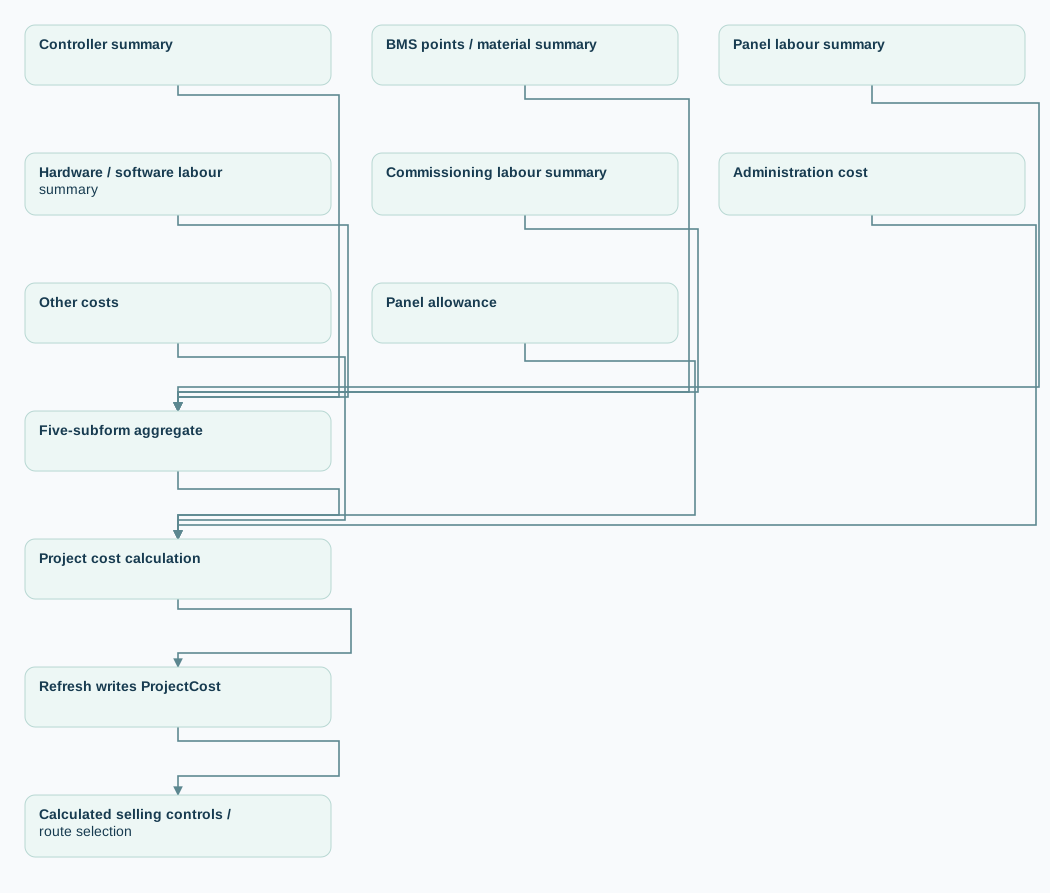
The inspected TotalSubform expression added five subform summary controls, each wrapped in Nz(): controller, BMS points/material, panel labour, hardware/software labour and commissioning labour. The cost calculation then added administration, other costs and panel allowance. These labels describe the control names; the underlying formulas and one-to-one mapping to cost categories were not independently established.
View diagram source
flowchart TD
    A[Controller summary] --> T[Five-subform aggregate]
    B[BMS points / material summary] --> T
    C[Panel labour summary] --> T
    D[Hardware / software labour summary] --> T
    E[Commissioning labour summary] --> T
    T --> C1[Project cost calculation]
    F[Administration cost] --> C1
    G[Other costs] --> C1
    H[Panel allowance] --> C1
    C1 --> R[Refresh writes ProjectCost]
    R --> S[Calculated selling controls / route selection]
What Nz() establishes
In this numeric expression, a Null term contributes zero. This prevents Null propagation but does not prove that the underlying subtotal is genuinely zero or that a form reference is valid. If subtotals were temporarily Null, zero substitution could conceal incomplete inputs; no runtime trace has confirmed that mechanism.
Diagnostic checkpoints
Use distinguishable synthetic subtotals, such as 10, 20, 30, 40 and 50, plus separate administration, other and panel values. Capture the five source controls, TotalSubform, CalCost, ProjectCost and both selling expressions before the first Click, after it and after the second Click.
The first point of divergence would help distinguish aggregation, recalculation and persistence problems. The full protocol and observed symptoms are in Refresh investigation.
Refresh Double-Click Defect — Investigation Plan
Read the detailed notes
Observed behaviour
Single clicks generally updated the original form correctly in day-to-day use. Repeated double-clicks produced either zero cost/selling or a cost containing only Panel Allowance and Other Cost. I inspected the Refresh procedure and the five-subform aggregate, but did not establish or fix the root cause. The standalone calculation does not reproduce form state.
Why event order matters
Microsoft documents that double-clicking an Access command button can trigger Click, DblClick and a second Click. This supports tracing repeated execution; it does not establish which subtotal or stored value first becomes wrong.
Reproduction protocol
Use synthetic inputs in a disposable copy. Give every subform subtotal a distinct nonzero value and calculate the expected total independently.
| Check | What to capture |
|---|---|
| Single Click | Edited detail values, five subtotals, aggregate, cost and selling |
| Double Click | The same values after each Click, including event count and order |
| Zero Other/Panel | Whether remaining component costs are retained |
| Nonzero Other/Panel | Whether any components disappear while these remain |
| Reopen the record | Whether displayed and saved amounts agree |
| Missing category input | Whether fallback follows the documented pricing rule |
Record the active record, focus, unsaved edits and relevant form/subform events alongside the values. A passing pure-function test is not evidence of a passing form regression.
Hypotheses and candidate improvements
Possible mechanisms include incomplete subform summaries, stale calculated controls, unsaved edits or other event side effects. Nz() could mask a Null subtotal as zero, but an observed trace is needed before attributing the defect to that mechanism.
Investigate cancelling the second Click through DblClick handling, explicit recalculation and calculating from stable values before writing totals. An in-progress guard alone does not establish protection from two sequential completed Click events. Test any change against the protocol above.